Stable
1.10.10117
Daily-driver build with the safest release cadence.
- Updated
- 2 days ago
- File Size
- 536.7 MB
- Release Notes
- Open notes
Stable is the recommended track for most users. Alpha gets you the newest capabilities first.
Daily-driver build with the safest release cadence.
Fastest release track with the newest features and experiments.
Every release stays linked here so you can inspect what changed before you switch versions.
Move To Parent option to Aura TreeAdded new convenience feature - PopOut for BTs and Macros. This button allows you to show your Macro or BT in read-only form in a separate window. It is showing state in real-time and allows to execute the tree/macro manually.

Improved item removal UX and aligned it with other parts of the program

Changed how Enabling Conditions and References in BTs and Macros look like:
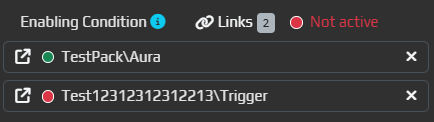
P.S. Note the icon to the left of the path - by clicking on it, you will be taken to that specific item.
C# Script node - when double clicked, code editor will be MaximizedLinks in them - when double clicked, you will be taken to the first link in the listLoginWidget not working properlyEvent LogFor years, Target Window was a prerequisite in all Capture triggers (Image/Color/Text/ML) - EyeAuras worked only with windows.
Starting from this version, we'll try a different approach:
Target Window is not set, EA will start capturing Primary ScreenTarget Window basically stopped Triggers from working. From now on, this will only switch the mode to Primary Screen capture and I would suggest to use Enabling Conditions to control the capture. This is very important! Check your old triggers to ensure that there are no "test" or "leftover" triggers as they will start eating up CPU.Target Window in many cases is not really required if you're playing games in Borderless Windowed or other similar modes where the game occupies the entire screenIMPORTANT! Multi-monitor setups are not supported yet. Only the primary screen will be captured. I'll extend support in the future

First steps toward offline mode - added new option in Settings which allows the client to function without connectivity to the server, even if the client gets restarted. For now, this is just a few hours, but as soon as I will be sure that the system properly works, this will be extended to days. This option will be removed in the future and will become default behavior of the client.

Added two new options in Packaging. Both of them are indended to be used by setups with custom scripts having their own UI. By leveraging Lifecycle Events trigger and C# script creating a custom Blazor Window, you can make it so YOUR user interface will be shown instead of EyeAuras.

If set, when the app gets fully loaded, main window will be minimized.
If set, the window won't even be displayed on the Taskbar, leaving only your custom window there.

Added two new examples which use BlazorWindows - Basic Window and Custom Login.
Login Widget allows to very easily integrate EyeAuras authentication into your app. It will get more customizable and extensible when I'll receive first feedback.

This trigger is designed to cover scripting scenarios such as running the script right when the app is opened. For now, there are only two events. We'll see whether some other events such as AppFocused could be useful.

In combination with other packing- and scripting-related features, I am targeting to streamline mini-app creation and make it possible to not bootup main EyeAuras UI at all. This is one of the steps.
Detailed information is available here
Using NuGet packages in scripts opens up a lot of new possibilities and is hard to underestimate its importance. But downloading and unpacking packages takes time - not much, but noticeable for end-user. From now on, when you're downloading any Pack, EyeAuras server will analyze your code and pre-download all needed packages.
This benefits:
That change IS NOT retroactive - it will affect only
newrevisions of packs.
In the changelog for the previous version I've mentioned that script compilation will be followed by script protection mechanism. It is extremely rough on edges still, so for a few weeks will be available only to very small group of people. Eventually this will become available for anyone.
Script Protection is part of Packaging options and is available only when you've set Compilation Mode to Binaries Only - it does not make much sense to apply it to binaries if you're distributing source code.
All you have to do is select desired mode, save options and upload your auras, just like you did before. Ideally, nothing should change for the end-user.
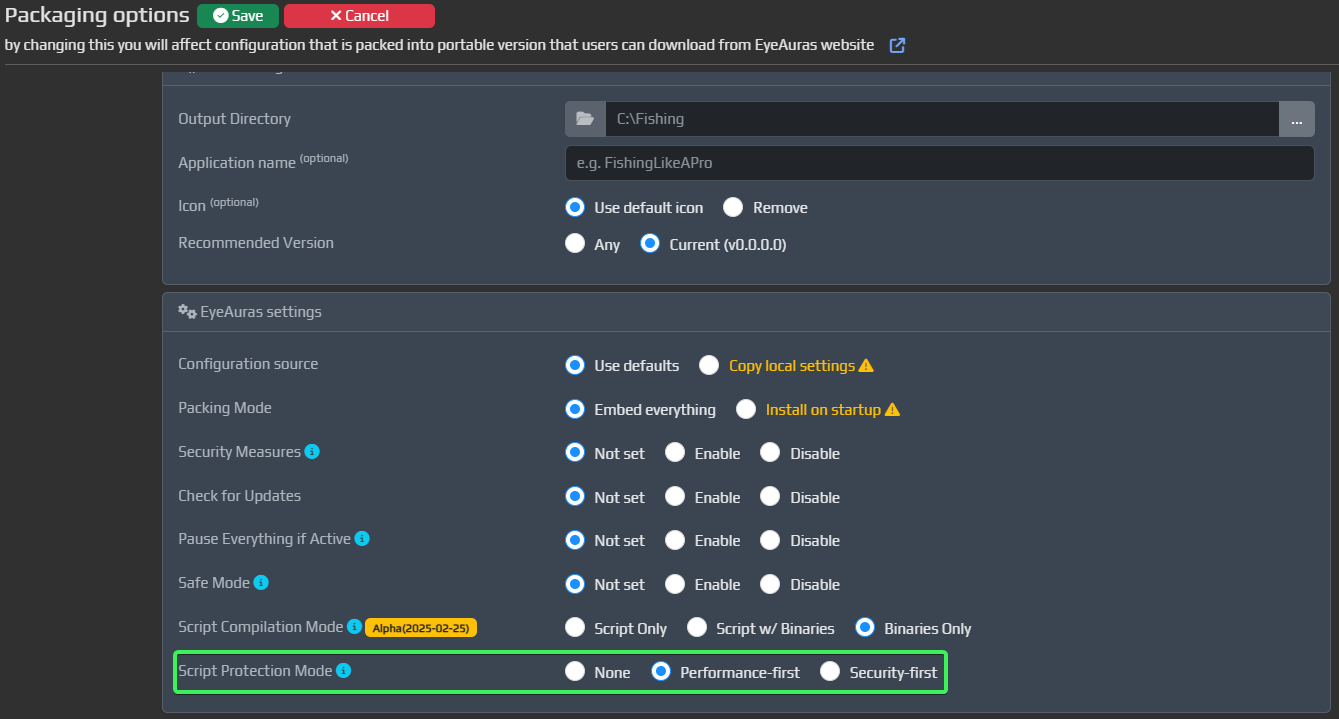
Please note, that infrastructure for this service is still extremely unstable and there could be problems spread everywhere - even if you have access to that feature, it may be worth giving it some time to cool down.