Stable
1.9.9774
Daily-driver build with the safest release cadence.
- Updated
- 6 weeks ago
- File Size
- 515.39 MB
- Release Notes
- Open notes
Stable is the recommended track for most users. Alpha gets you the newest capabilities first.
Daily-driver build with the safest release cadence.
Fastest release track with the newest features and experiments.
Every release stays linked here so you can inspect what changed before you switch versions.
Багфиксы
#EA-1266EyeAuras.Blazor.Controls в PoeShared.Blazor.Controls - нужно обновить неймспейс#EA-1294Embedded Resources в Script Properties: список ресурсов, операции с файлами, отображение деревом, лимиты списка и сценарии с references/NuGet.EmbeddedResources теперь должно быть проще подключать - добавлена поддержка частичного совпадения по пути (/res/my.png => res/my.png и my.png найдут ресурс)Send Sequence - добавил забытые ранее элементы для MouseMove#EA-1295#EA-1292Security measures.#EA-1265Небольшой патч после большого обновления 1.9.9545. В основном тут исправления для EyePad, предпросмотра видео и SDK-зависимостей.
Поправил запуск файлов через EyePad.
Если EyeAuras стартует с .json или .v1.enc, такие файлы теперь открываются как aura-файлы и запускаются через aura tab. При этом обычное открытие .json внутри EyePad все еще работает как текстовый файл.
Еще несколько правок рядом:
InvalidDataИсправлена гонка в предпросмотре видео: старый frame buffer мог уже освободиться, а UI все еще пытался прочитать из него кадр.
Теперь такие устаревшие кадры просто пропускаются или логируются, вместо того чтобы ронять предпросмотр.
.json и .v1.enc, переданные при запуске приложения, теперь открываются как aura-файлы..json в самом EyePad осталось текстовым.InvalidData.EA-1258: notification overlay мог ломаться после obfuscation.ImageSharp и Unity, удалена старая прямая ссылка на OpenAI 1.7.2, чтобы убрать downgrade-конфликты NU1605.Два главных фокуса апдейта:
По AI важный пользовательский момент: появились бесплатные лимиты, чтобы можно было попробовать Assistant без ручной настройки OpenAI-аккаунта. Это особенно важно для пользователей из РФ: OpenAI сейчас блокирует работу с такими пользователями, а EyeAuras Gateway закрывает эту проблему. Если нужен полный контроль, можно указать собственный OpenAI API key или совместимый endpoint; в этом режиме EyeAuras ходит напрямую и Gateway не используется.
Остальные крупные направления:
.csx, .sln, Live Import и внешних IDEЕсли вы недавно в EyeAuras: pack - набор аур/скриптов, а mini-app - готовое решение, собранное поверх EyeAuras.
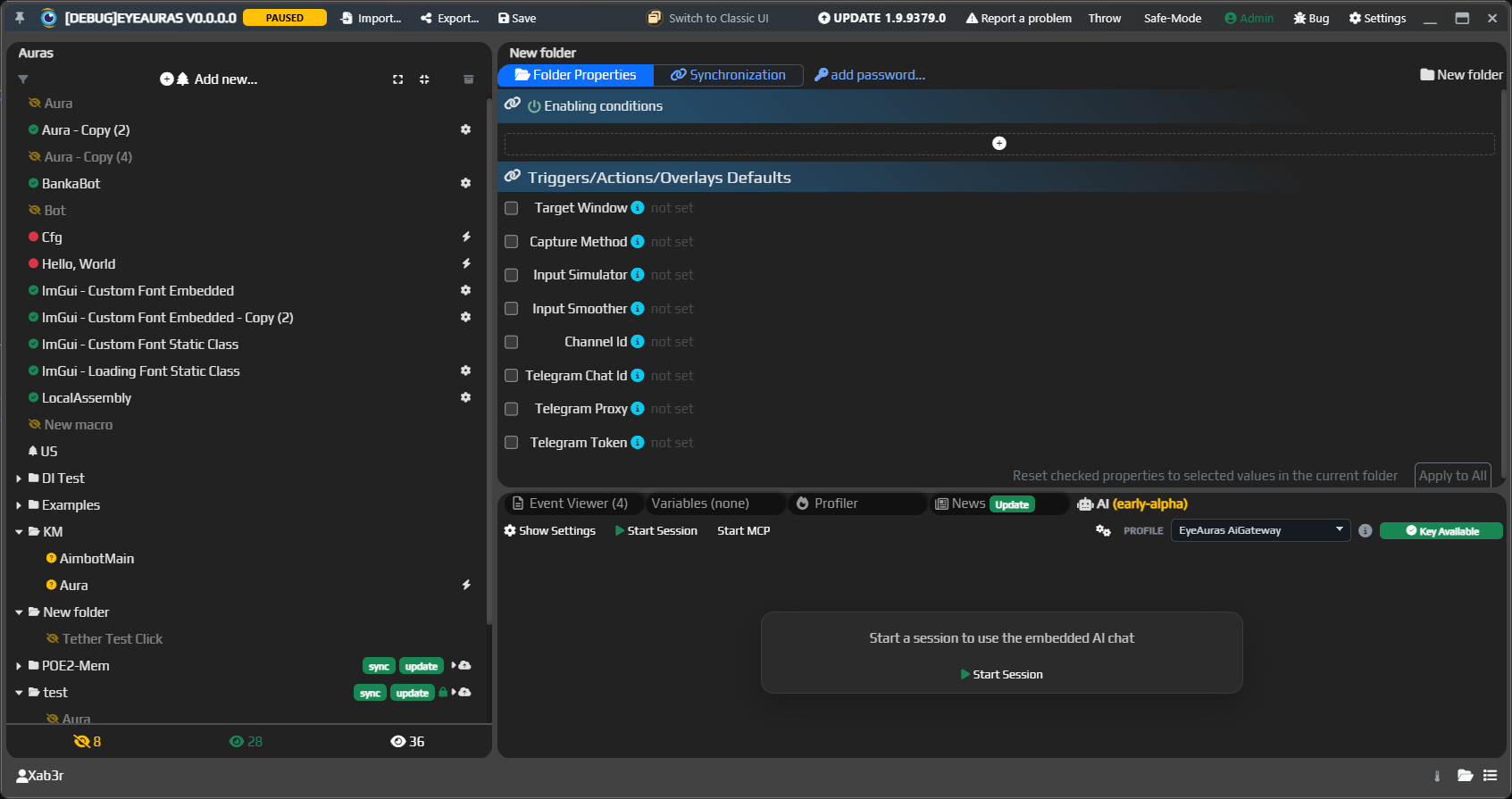
Задача этого обновления была выравнять функционал нового и старого интерфейсов. Дальнейшее развитие будет именно в новом UI. Старый будет отключен в одном из следующих обновлений.
Второй основной фокус этого апдейта - AI. Теперь он разделен на два сценария:
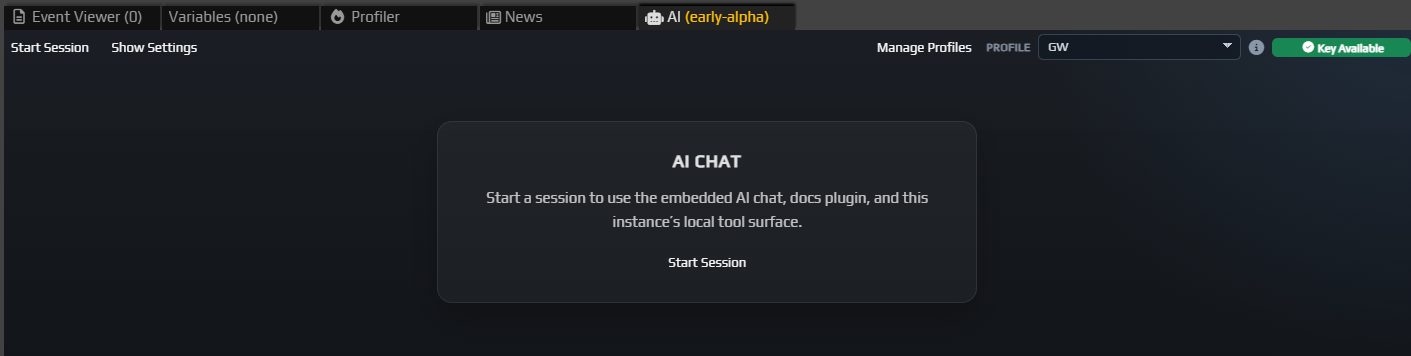
EyeAuras интегрируется с OpenAI и OpenAI-compatible API: можно указать свой OpenAI API key или совместимый endpoint, и запросы будут идти напрямую туда.
У OpenAI нет бесплатных лимитов для таких сторонних интеграций, при этом хотелось бы, чтобы пользователи могли хотя бы попробовать новый функционал без лишних заморочек. Поэтому EyeAuras берет эту роль на себя через EyeAuras Gateway - по сути прокси-сервер перед OpenAI. Благодаря Gateway бесплатные лимиты доступны и для Assistant, и для Codex: можно начать без отдельного OpenAI-аккаунта, ключей и endpoint'ов. Этого должно хватить чтобы периодически обращаться к помощи AI.
Gateway также решает проблему с ограничениями доступа для пользователей из РФ: OpenAI сейчас блокирует прямую работу с такими пользователями, а EyeAuras Gateway позволяет пользоваться AI-функциями без отдельной настройки обходных маршрутов. Если вы указываете свой API key или endpoint, Gateway не используется. В обозримом будущем будет возможность пополнить счет EyeAuras, чтобы даже будучи в РФ иметь возможность использовать AI.
AI Assistant - это умный справочник по EyeAuras и легкий режим для простых изменений: какой триггер выбрать, почему не сработало действие, где нужный раздел wiki, как выглядит минимальный пример C#-скрипта или что поправить в текущей настройке.
Параллельно появился EyeAuras Bot в Discord. Это тот же быстрый формат помощи, но вне приложения: бот знает wiki, changelog и scripting best practices.
Wiki теперь доступна на русском и английском. Это важно и для пользователей, и для AI: чем лучше документация, тем точнее становятся Assistant, Discord Bot, Codex и внешние coding agents.
Codex Coding Assistant - это более сильный режим для задач, где простого ответа или небольшой правки мало. Он работает рядом с EyePad и внешней IDE: видит файлы и папки workspace, держит контекст задачи, может составить план, внести правки, учесть diagnostics редактора и объяснить, что изменилось.
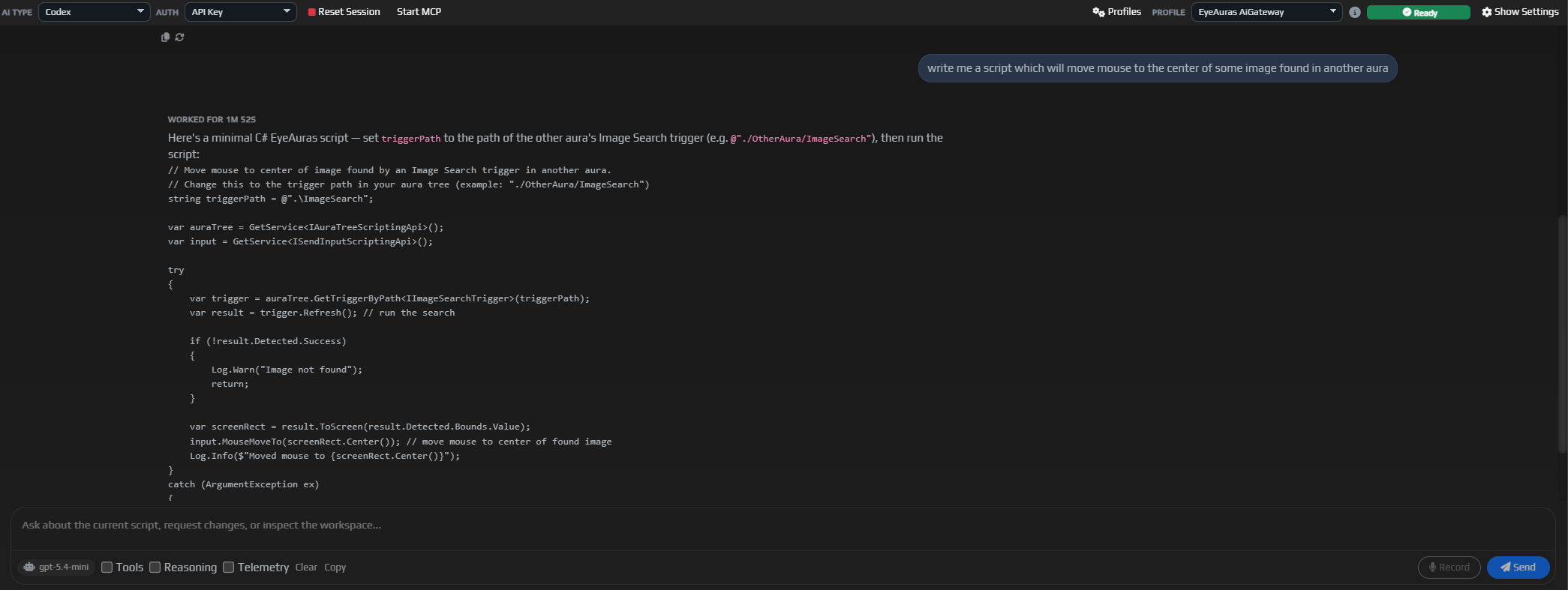
Типовые сценарии для Codex: написать или починить C#-скрипт, разобраться в Behavior Trees, собрать pack, подготовить mini-app, использовать Live Import, подключить Memory API или объяснить ошибку прямо по текущему проекту.
Codex - это будущий основной режим AI в EyeAuras для задач, где нужно видеть проект целиком.
Если коротко: Assistant дешевле и быстрее для справки, идеи или простой правки. Codex умнее и лучше подходит для задачи "помоги сделать это в моем проекте".
Старые ограничения Free-версии сняты почти полностью: лимиты на количество аур, размер скриптов, интеграции и основные возможности больше не должны упираться в старую Free/Pro-модель.
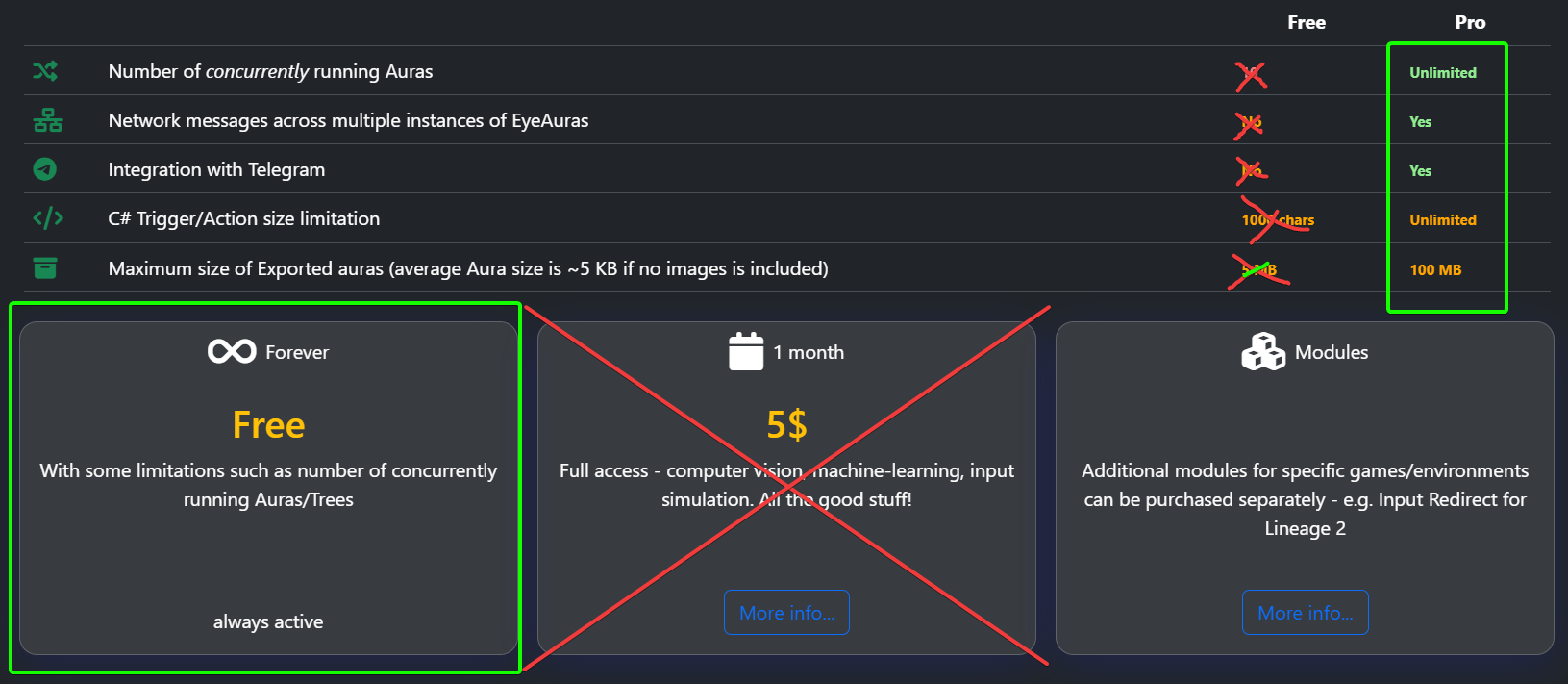
Единственное заметное исключение пока остается вокруг сетевых сообщений: использование Network Message trigger и Send Network Message action все еще требует лицензии. Это технический хвост старой модели, который я планирую убрать в одном из следующих крупных обновлений.
В целом EyeAuras теперь движется в сторону бесплатной базовой программы. Монетизация должна смещаться с ограничений внутри самой программы на готовые продукты, сделанные поверх нее: pack'и, mini-app и авторские решения.
Саблицензии - это уже не про ограничения EyeAuras как программы, а про то, как авторы могут распространять свои собственные решения.
Если вы делаете pack, mini-app или приватную автоматизацию для команды/клиента, теперь можно собрать более подходящую модель доступа из доступных опций. Например:
Идея в том, чтобы EyeAuras оставалась максимально свободной как платформа, а авторы могли аккуратно монетизировать то, что они построили поверх нее.
Крупные изменения:
RegisterViewType(...)Script Properties, управление NuGet, References и Embedded ResourcesMemory API получил отдельный раздел документации. Это способ брать состояние прямо из процесса. Основная область применения - C# скрипты, однако вполне можно прокидывать вычитанные значения через переменные.
Например, можно читать координаты, HP, текущую цель, вычитывать список объектов и т.п.
Что это дает на практике по сравнению с использованием того же WinAPI напрямую:
LocalProcess, а затем буквально поменяв одну строчку ровно тот же код использовать для работы с DMA-устройством, драйвером или вашим сверх-секретным способом чтенияReToolsPlugin можно подключить прямо в своих Memory API-скриптах и дать AI-агенту инструменты для реверса выбранного процесса: читать память, искать данные, дизассемблировать, разбирать RTTI, сохранять findings и продолжать работу уже от найденных фактовEyePad продолжает превращаться в отдельный режим работы для тех, кто пишет код, запускает скрипты, импортирует pack'и и работает с .sln.
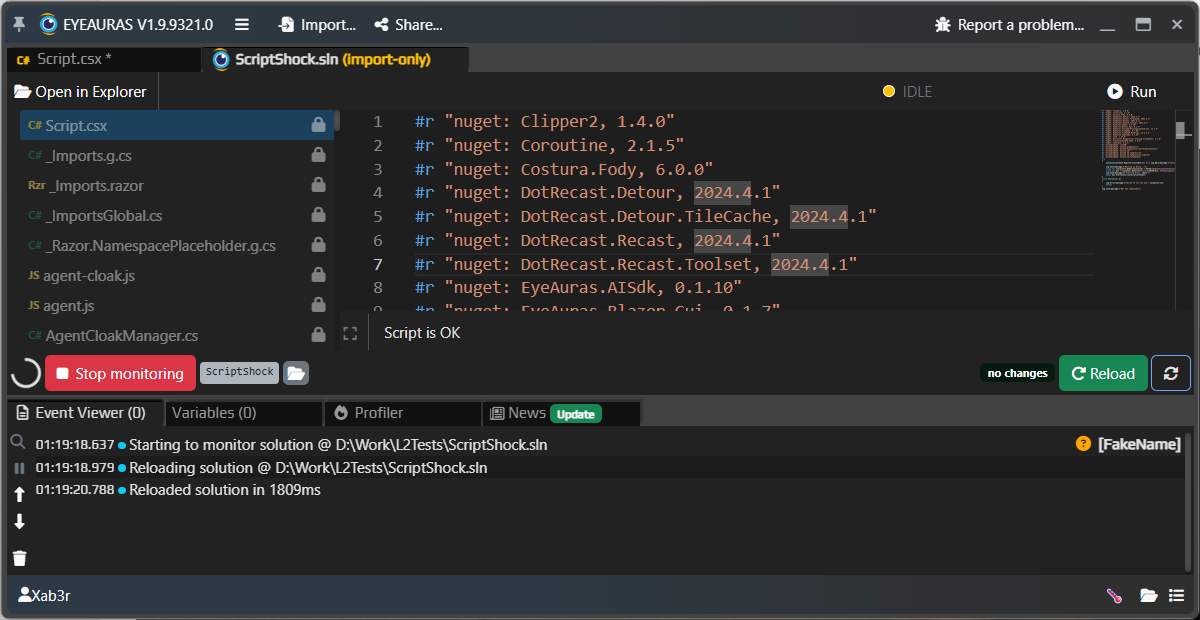
Важный сдвиг здесь в том, что EyePad стал ближе к реальной рабочей среде, а не просто к встроенному редактору. Можно открывать одиночные .csx и текстовые файлы, работать с .sln, запускать Live Import, импортировать pack и постепенно превращать эксперимент в полноценный проект.
Отдельно улучшена надежность работы с файлами. Черновики, сохраненные файлы, внешние изменения на диске и восстановление после перезапуска теперь должны вести себя понятнее. Это особенно важно для AI-сценариев: если Codex или внешний агент работает с проектом, ему нужен настоящий файловый контекст, а не "магический" текст в памяти редактора.
Это еще не финальная Explorer/workspace-модель, но направление уже понятно: EyePad должен стать нормальной оболочкой для workflow "пишу код, тут же запускаю и довожу до pack или mini-app".
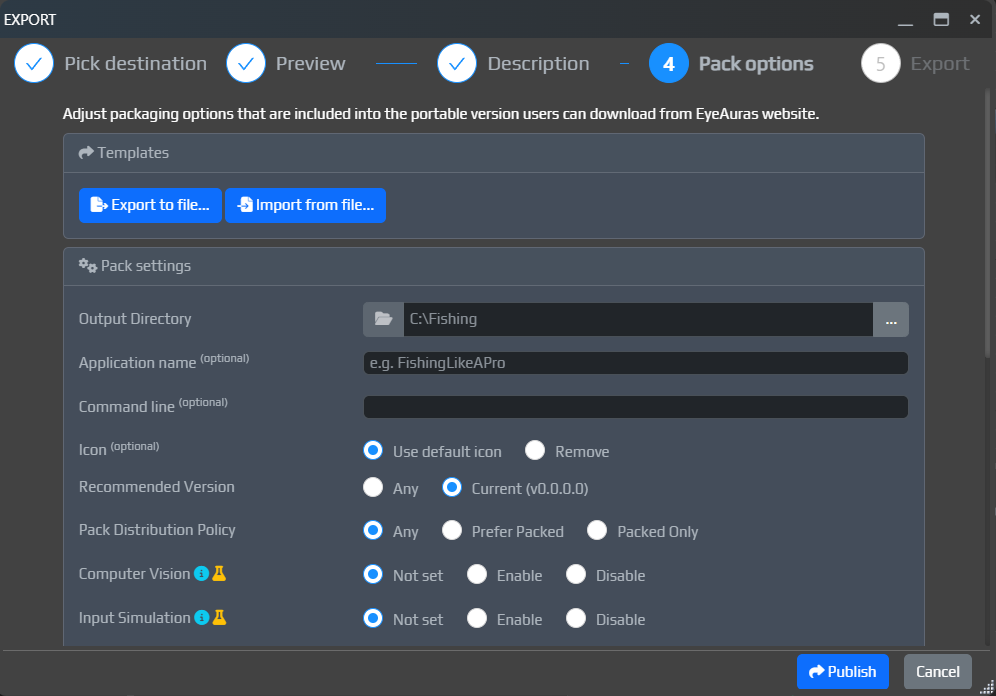
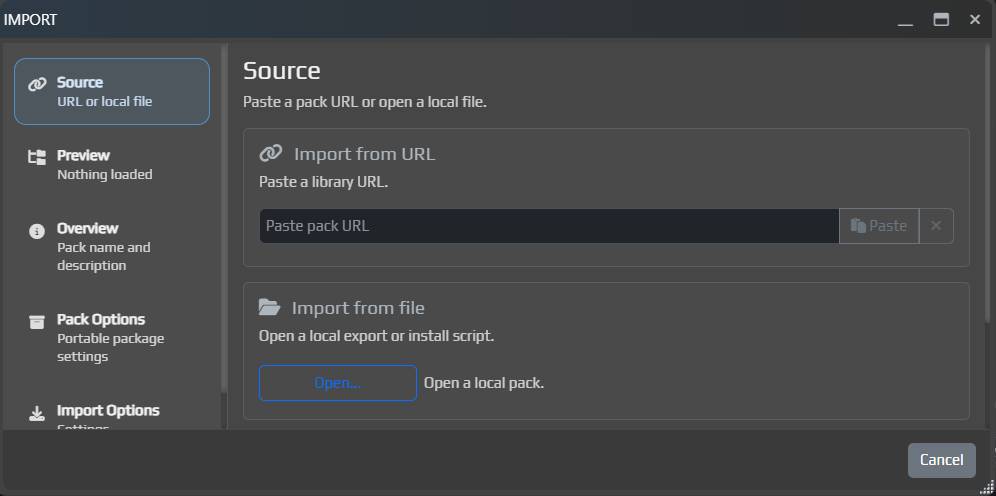
Export / Import заметно подтянут как визуально, так и по части функционала
Что изменилось:
Export можно задавать параметры pack'а, имя и описаниеЦель остается прежней: привести workflow к состоянию, где рабочую mini-app можно собрать максимально быстро, буквально в пару кликов. Мы уже на 90% там!
В Image Search появился встроенный редактор шаблона.
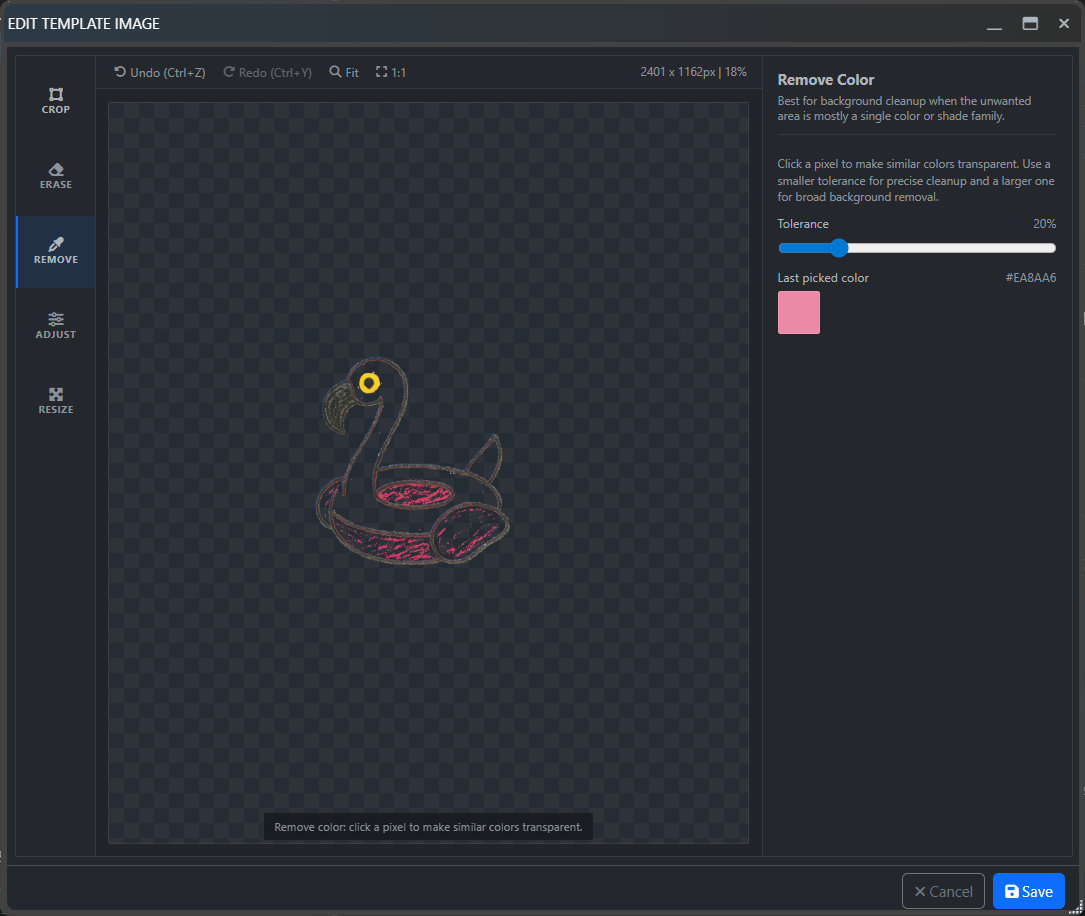
Теперь прямо внутри триггера можно:
Также улучшено отображение image preview в новом UI, исправлены проблемы с template rendering и добавлена недостающая доступность IComputerVisionExperimentalScriptingApi в SDK.
Ниже собраны пункты из Bugfixes / Improvements по всем changelog'ам, вошедшим в этот большой апдейт. Список отсортирован по важности: сначала crash/freeze, затем Licensing/Auth, UI, Scripting и остальные группы.
SendInputController, который мог проявляться в сценариях с Ctrl+VSharePreviewAiChatSession, связанный с SetInputSinksublicenseEyeAuras.ImGuiSdk, 0.1.42: markdown-редактор, анимации, составные кнопки, интеграция шрифтов, изображения, кэширование и многое другое.WindowListProvider: когда заголовок окна обновлялся, EA теряла окно на 1 кадрBindings мог не всплыватьSubTree в деревьях поведенияBlazor-окон когда окно резко "упрыгивало" в сторонуBlazorWindow, из-за чего окно должно вести себя лучше под нагрузкойBlazorWindowIWindowSelector.FindWindow: отсутствие окна больше не должно приводить к исключениюRegisterViewType(Type viewType, Type dataContextType, object key = default). Это позволяет регистрировать собственные UI-виджеты.CreateRemoteThread, APC и другие). Обратите внимание: инжект и чтение памяти зависят от защиты конкретного процесса; для игр и приложений с anti-cheat могут потребоваться отдельные подходы, совместимые методы доступа или дополнительная настройка.ScriptContainerExtensions повторно регистрировался BT-нодами. Из-за этого singleton-объекты на деле переставали быть... singleton-объектами.DefaultNuGetPackageBlacklist, что улучшает совместимость со старыми пакетами netstandard1.3 и netstandard2.IComputerVisionExperimentalScriptingApi был недоступен в SDKCould not build the proper workspace state, please report this errorEmbedded Resources и StaticWebAssets у NuGet-пакетов - особенно полезно для UI-компонентов и пакетов, которые тянут свои веб-ресурсыOpenAI и EyeAuras Gateway (прокси для OpenAI)@everyone, ролей и пользователейResponses API: добавлена потоковая выдача ответовIEyeAurasAiGuidanceService вынесен так, чтобы scripts могли программно получать guidance pack - можно загрузить пакет доков и скормить AI прямо изнутри вашего скрипта, тем самым дав AI больше контекста о вашем паке/приложенииNuGet и package references теперь должны корректнее доезжать до packed-сборокExport (когда выставлен режим Binaries Only).gitignore при project exportA new Agent Guidance page has been added to the AI settings.
In short, EyeAuras can now prepare a portable guidance-pack folder for external AI coding agents. It contains up-to-date docs, examples, SDK notes, metadata, and MCP status.
This is useful when you open an EyeAuras project, an exported workspace, or a C# project in an external agent such as Codex, Claude Code, Cursor, and similar tools. You no longer need to manually explain what EyeAuras is or where the correct context lives every time.
Important: EyeAuras now works at the folder level. Your project AGENTS.md is not changed or overwritten. The guidance pack itself includes its own AGENTS.md, which the agent can use as a starting point.
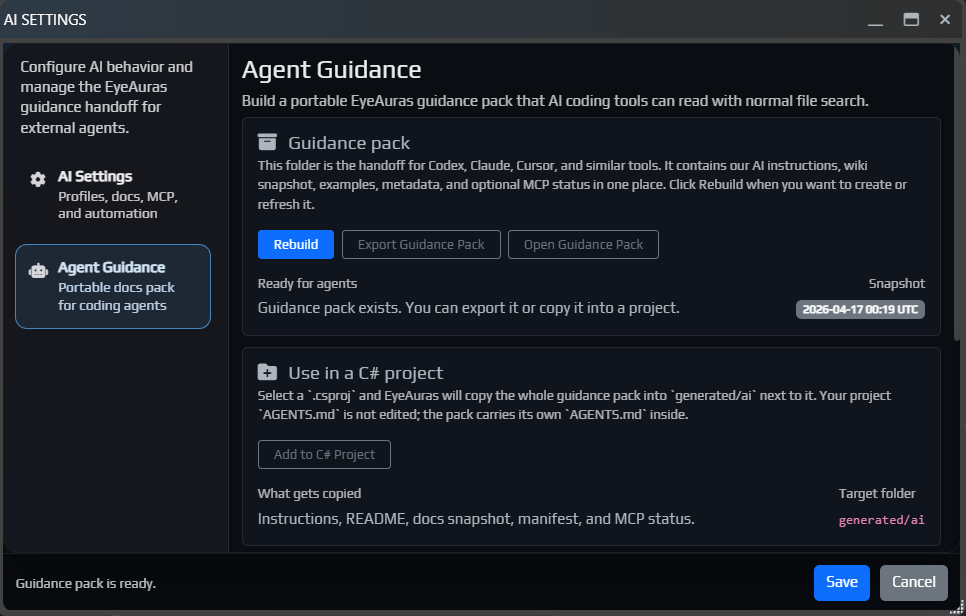
From this window, you can:
generated/ai through the selected .csproj or .sln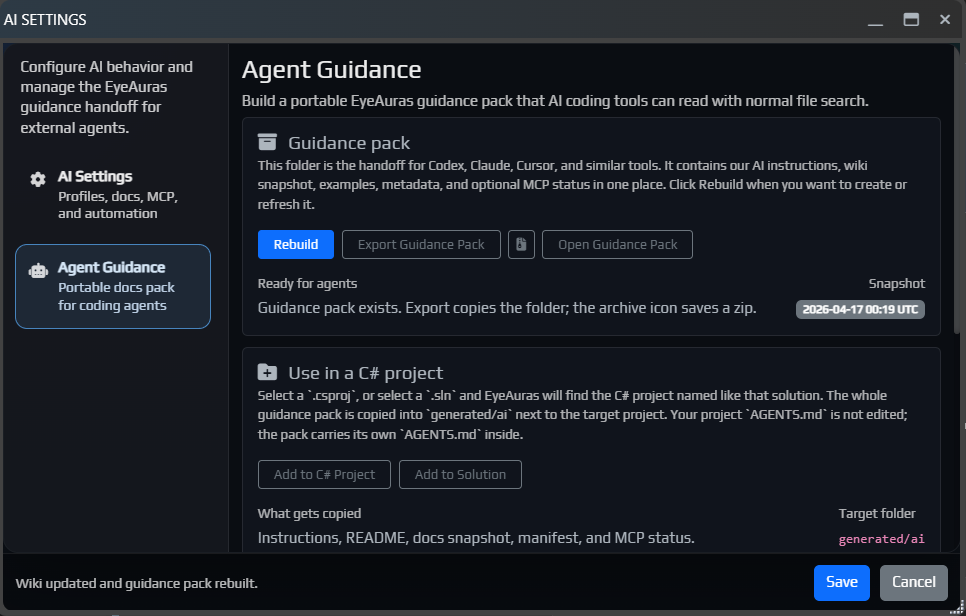
The pack contains AGENTS.md, README.md, docs/, manifest.json, and, if MCP status was recorded, mcp-status.json.
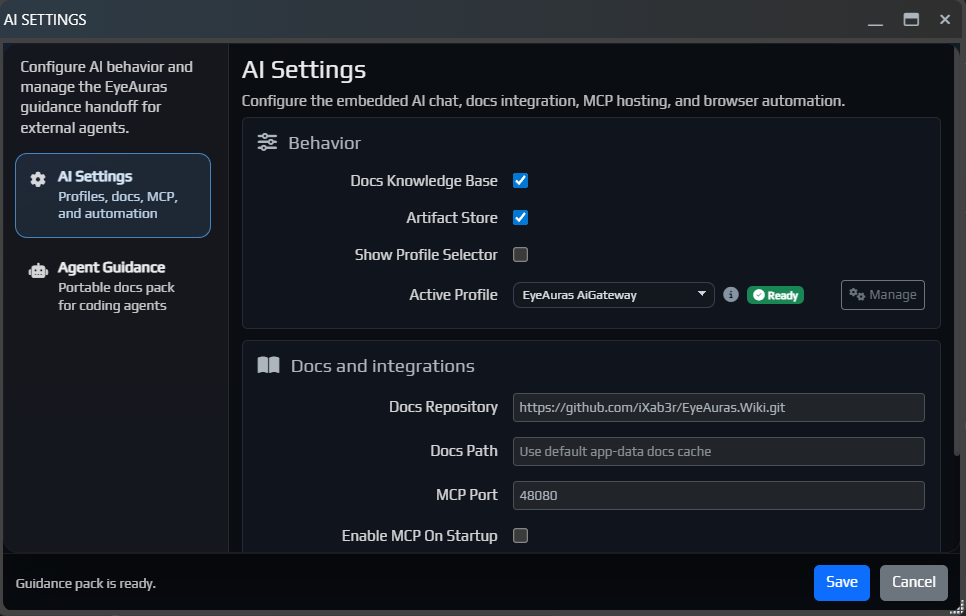
The generated/ai folder is managed by EyeAuras and is fully replaced when copied again.
Read more:
The same window now also includes a more convenient MCP helper.
MCP is a local bridge that lets an AI agent request targeted context from EyeAuras. The docs remain the primary source, and MCP is best enabled when the agent needs to ask EyeAuras about the current application state, windows, or available objects and symbols.
For normal wiki questions, you can safely ignore it. For external coding agents and more advanced scripting tasks, it can be very useful.
EA-1236 by S1lver)The built-in AI and Codex IDE Context mode has been improved. The assistant now has a better understanding of which script, aura, or project you are currently working with.
If the project has already been exported to disk, the AI can now use real diagnostics, symbol search, and documentation more confidently. In practice, this means that for more complex tasks it should rely on the actual project more often and guess less.

The C# Overlay editor now includes a Clone as Action button.
It clones the current overlay as an OnEnter C# Script action, then automatically collapses and disables the overlay itself. This is useful when an overlay started as a quick prototype and later needs to be turned into a regular action without manually copying the project.
Also fixed a transparency bug in C# Overlay that could cause the overlay to behave incorrectly.

BlazorWindowНебольшой патч, который должен улучшить отзывчивость окон под нагрузкой и помочь вашим пакам быстрее попадать в поисковую выдачу.
Добавлена новая документация по Memory API для C#-скриптов. В ней постепенно раскладывается базовая модель работы с памятью в EyeAuras: какие есть backend'ы, с чего лучше начинать, как искать code cave, как подключать свой IProcess и как строить собственные memory backend'ы.
Полезные точки входа:
Во внутренние API лицензий добавлены новые подписанные поля у UserLicense, а у саблицензий появился явный MaximumSessions.
var license = GetService<ILicenseAccessor>();

Log.Info($"UserId: {license.UserId}");
Log.Info($"Roles: {string.Join(", ", license.Roles)}");
Log.Info($"AppVersion: {license.AppVersion}");

if (license.ShareSublicenses.Length > 0)
{
    Log.Info($"MaximumSessions: {license.ShareSublicenses[0].MaximumSessions}");
}
Подробнее: Лицензии на паки
В IProcessControlApi появились явные FreeMemory(...) и ProtectMemory(...). Теперь выделенный регион можно не только получить через AllocateMemory(...), но и нормально довести до конца: поменять protection, выполнить нужные действия и затем корректно освободить.
using System.Diagnostics;
using EyeAuras.Memory;

using var process = LocalProcess.ByProcessId(Process.GetCurrentProcess().Id);
var control = (IProcessControlApi) process;

var region = control.AllocateMemory(
    IntPtr.Zero,
    4096,
    MemoryAllocationType.Commit | MemoryAllocationType.Reserve,
    MemoryProtectionType.ReadWrite);

var oldProtection = control.ProtectMemory(region.Address, region.Size, MemoryProtectionType.ExecuteRead);
control.ProtectMemory(region.Address, region.Size, oldProtection);
control.FreeMemory(region);
Подробнее: Memory API - С чего начать
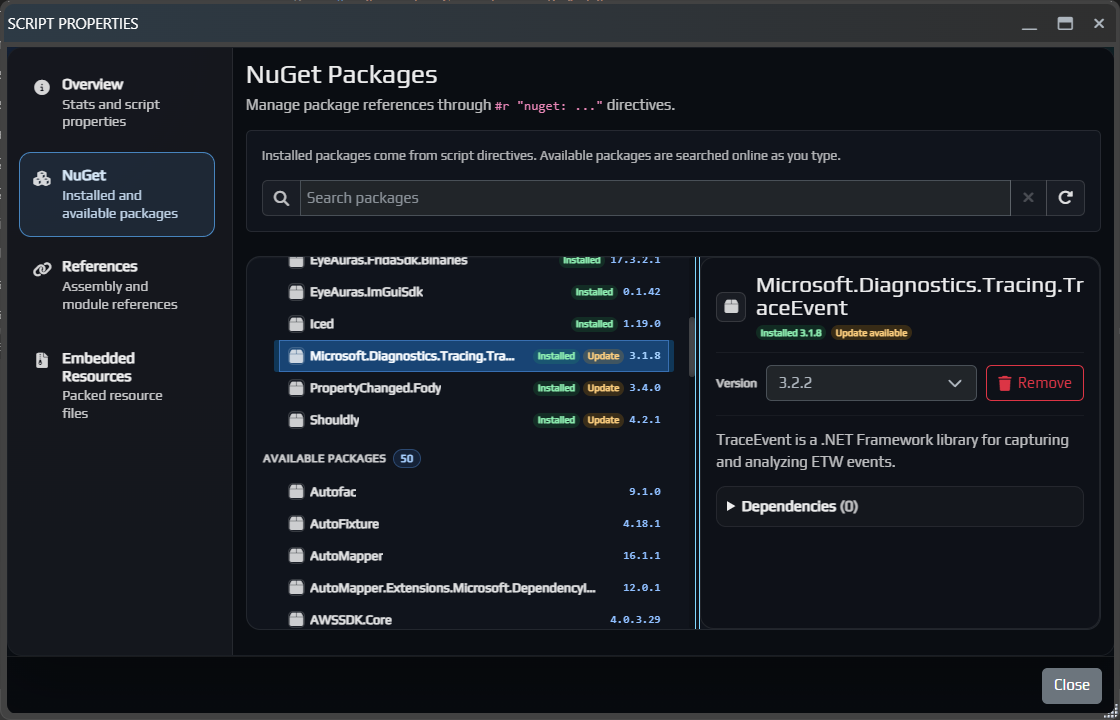
BlazorWindow, из-за чего окно должно вести себя лучше под нагрузкойsublicenseScrydeC# scripts now have a Properties button that opens a separate script properties window. It brings the main settings and dependencies together in one place: Overview, NuGet package management, References for internal and external assemblies, and Embedded Resources for files that should be distributed together with the script.
Learn more:
Codex now understands EyeAuras-specific details better, so it should be more useful for complex technical tasksExport and Import dialogs to make them more convenient to useBlazor windows, where the window could suddenly jump to the sideICodeHighlightService errorCodex внутри EyeAuras продолжает обрастать более рабочим UX: отдельные threads, более понятный flow работы и в целом более практичный режим для сложных coding-задач.
Если обычный AI Assistant удобнее как быстрый in-app chat и справочник, то Codex уже сейчас лучше воспринимать как отдельный режим для более тяжелых технических задач.
Подробнее про AI Codex Coding Assistant

Продолжает развиваться и поток Export / Import: теперь это уже заметно более внятный и удобный способ публиковать pack'и, обновлять их и импортировать обратно с превью и нормальными опциями.
EyeAuras GatewayThis update is mostly focused on bug fixes and polishing a few parts of the UI.
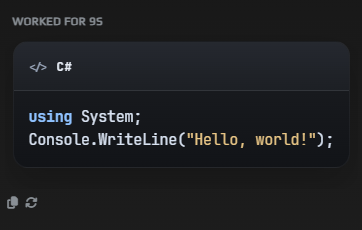
Added code rendering in dedicated blocks.
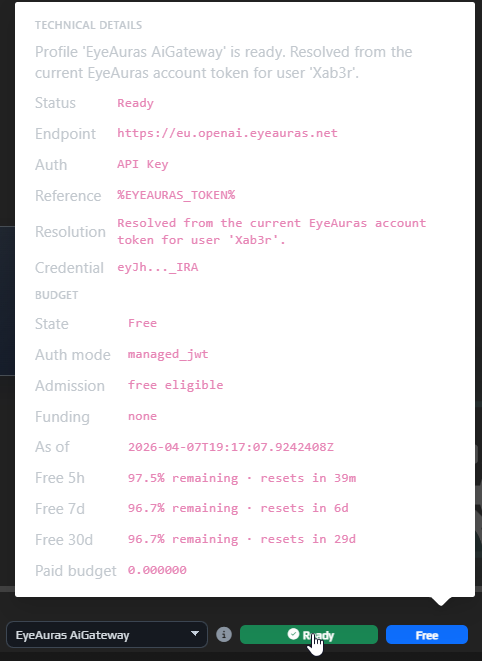
Added budget and limit display. Just hover over the status next to your profile.
Export when Binaries Only mode is enabledThe Export window has been improved. You can now set packing parameters directly there, and also specify the pack name and description.
This still is not the final version of the flow. The goal for the next two months is to bring it to a point where you can assemble a working mini-app in 10-15 minutes, have AI write it for you, upload it in one action, and immediately share it with anyone interested.
Right now we are roughly 70-80% of the way there, especially after the latest fixes.
The in-app update window has also been improved.
It is now easier to navigate the changelog:
RU and EN patch notes directly inside the update window

Free limits were added to EyeAuras AI Gateway.
This was done so everyone can have AI available right away, without needing to register an OpenAI account, add budget there, or pay for a subscription. This is especially important for users in Russia, where direct access to OpenAI is still blocked.
For most users, AI will probably be more of a reference tool: quickly look something up, ask a one-off question, understand a topic, and move on. I hope the free limits will cover exactly that kind of use. For full-scale coding and serious scripting, they most likely will not be enough.
Important: AI is expensive. I reserve the right to keep adjusting these limits, their availability, and the general usage rules as the feature starts seeing real load. The program is free, and I still want at least some AI access to be available to absolutely everyone, so we need to find a balance.
In simple terms, EyeAuras Gateway is a special server address that you can put into the AI profile in the OpenAI Endpoint field, next to API Key and the other settings.
From the user's point of view, it is almost the same as a regular OpenAI profile, except that instead of the standard endpoint you use EyeAuras Gateway.
This is mainly useful for people who do not want to create their own OpenAI key, or who live in Russia. If you already have normal access to OpenAI, direct OpenAI is usually still the simpler option.
EyeAuras Gateway now supports two modes.
This is the main mode. You use AI as an EyeAuras user.
In this mode, you do not need your own OpenAI account. This is how the free limits work: the OpenAI costs are covered on the EyeAuras side, and you simply use AI inside the program.
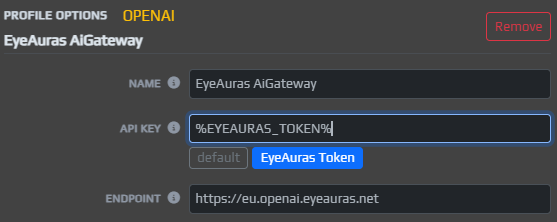
This is the fallback mode. In it, Gateway does not pay for anything on your behalf and simply forwards requests to OpenAI servers using your own key.
This is only needed for users in Russia.
In short:
Gateway - you want to use AI without your own OpenAI accountProxy - you already have your own key, but need a convenient path to OpenAIImportant: in Proxy mode, your personal OpenAI key passes through EyeAuras servers. Technically, I tried to make this as safe as possible and avoid storing or logging anything unnecessary, but it is important to understand how the setup works.
Support for Codex was added. In my opinion, it is one of the strongest AI assistants available today.
From the user side, the idea is roughly the same as with regular ChatGPT: you give it a task, and the assistant tries to solve it using every tool available. The key difference is that Codex tends to dig much deeper into the problem, re-check its conclusions more often, and usually produces stronger results on complex technical tasks.
Right now, Codex and Claude Code are driving a lot of practical AI programming forward, and now this kind of integration is available here as well.
For now, Codex is not running at full power yet: not all the wiring is connected. For example, I intentionally have not connected it to the scripting system yet, even though that is one of the main future use cases and one of the reasons it was added in the first place. Automatic behavior tree generation, writing scripts, self-diagnostics in the style of "why is this not working" - these are exactly the kinds of scenarios where Codex is especially strong. But first, we will spend about a week evaluating the integration quality itself, let it work as a reference tool for now, and then give it more freedom.
The main use case for Codex is complex work: programming, automatic configuration of auras, trees, macros, and similar systems.
Using it just as a reference tool is a bit like using a cannon to shoot sparrows. On top of that, this kind of usage may simply be more expensive, because Codex tends to double-check itself. That is great for quality on difficult tasks, but not very cost-effective for simple ones.
You can always switch between Codex and regular Chat mode, but conversation context is not shared between them.
p.s. The UI is still under active development. This is far from the final version.
StayOnTop button in the window title barSubTree could not be deleted in behavior trees