Stable
1.10.10117
Daily-driver build with the safest release cadence.
- Updated
- 2 days ago
- File Size
- 536.7 MB
- Release Notes
- Open notes
Stable is the recommended track for most users. Alpha gets you the newest capabilities first.
Daily-driver build with the safest release cadence.
Fastest release track with the newest features and experiments.
Every release stays linked here so you can inspect what changed before you switch versions.
C# ScriptsWaitFor action now behaves exactly as Delay if it does not have any links in itLocalProcess memory-reader breaking after multiple sequential reloadsIn 8540 I've tried to fix the problem displayed on the screen below - some of the panels in the program overlap and create unpleasant and glitchy effect. The problem, unfortunately, is not on EA side, but in one of the core frameworks that is developed by Microsoft. In February, they've posted that the bug is finally fixed, so I've tried to upgrade to that version and for the last couple of weeks we've all been testing their fix. As a result of that testing, I have to rollback the change - the new version fixed overlap problem, but introduced 3 new problems:
So, for now, the airspace issue is back. I'll keep monitoring the situation.
WindowHandle || ProcessName || WindowTitle instead of WindowHandle || WindowTitle || ProcessNameSo, what’s new?
Over the last few months, most of the work has gone into C# scripting. There were a lot of changes there, mostly focused on making development simpler and improving compatibility with different NuGet packages. Development is gradually shifting toward a better scripting experience overall — the goal is to make creating useful mini-apps as simple as possible, whether that’s a small automation tool or a full-fledged bot. Under the hood, they use EyeAuras’ extensive capabilities, but what they look like on the outside is your choice.
There is already a full set of features for this:
And that’s still not all — this list will soon grow to include cryptocurrency payments, fully hiding the EyeAuras interface, and much more. The goal is to minimize the time between having an idea and seeing happy users launch your mini-app.
I expect mini-apps to become the main way to fund the rest of EyeAuras development mentioned below. Time will tell whether that turns out to be true.
Nothing bad. Yes, the next few months will most likely be focused on scripts, but the plans include:
Those freezes when switching between auras will finally be gone. Startup should also become about 3–5 seconds faster. The transition will take around a year.
We already have Auras, Macros, Behavior Trees, and Scripts. All of them are great for solving different kinds of tasks: trees for full bots, auras for small simple automations like auto-potions, macros for automating a clearly defined sequence of actions, and scripts as the universal hammer for which everything looks like a nail. At this point, there is no problem that cannot be solved with the tools already available.
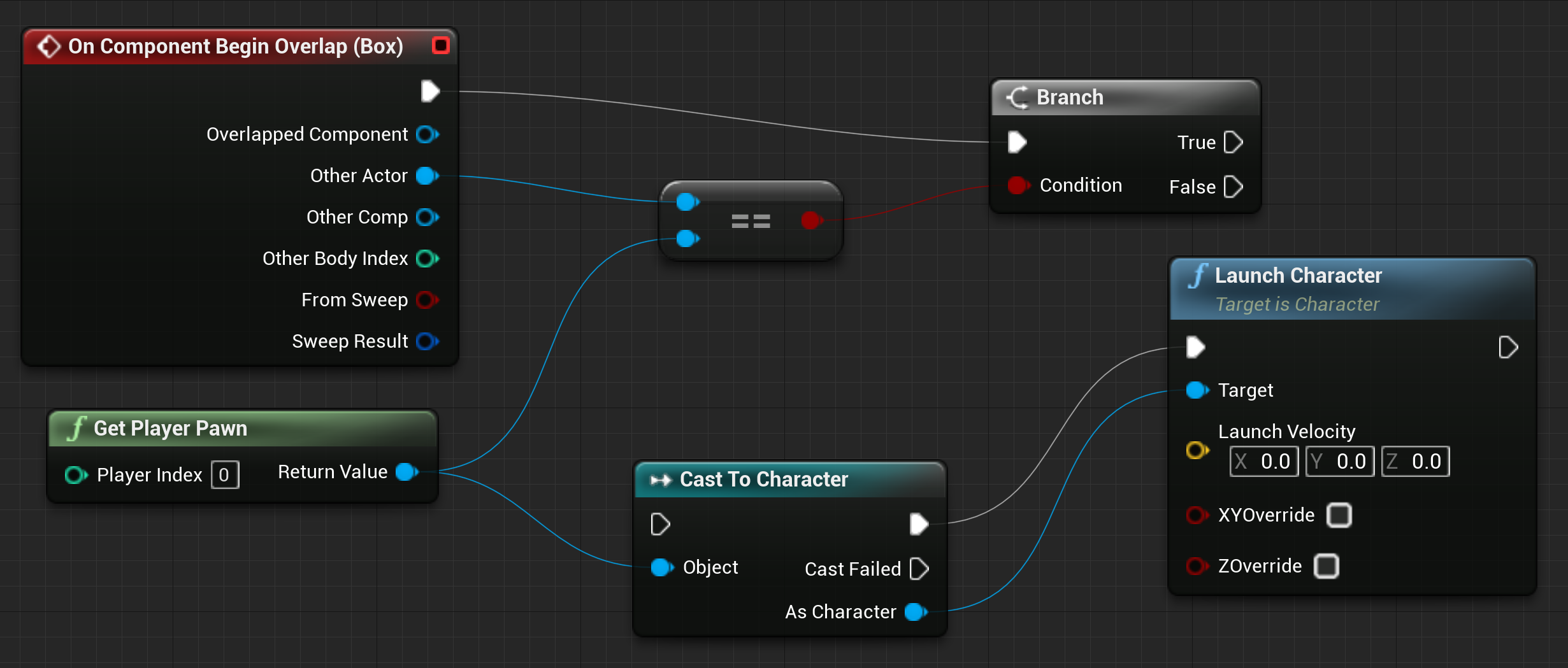
However, there is always room to grow. If you are familiar with Unreal Engine, you probably already know what this is about. The idea is to combine what already exists in Auras and Behavior Trees into one more visual programming tool: Blueprints. The main concept is to let users place Auras on the same canvas where they currently build Behavior Trees, and configure reactions to those aura triggers. That would give you everything needed to build logic in one place: events, action sequences, and standard control flow like loops — all visible at once. And of course, nothing prevents you from calling behavior trees or macros directly from blueprints.
This will take many months of development, but I think we will see the first results later this year.
This is a natural continuation of the mini-app idea. The difference is that your application becomes the main product, while EyeAuras turns into a huge toolbox you can use as needed. Want screen capture? No problem. Simulate input using one of a dozen methods? Also possible. Or maybe you want to embed only C# scripting and let users write their own code? The scripting infrastructure, proven over the years, is ready for that too. Absolutely every feature available in EyeAuras, without exception, is available as plug-in modules.
All technical issues have already been solved, and there are already early SDK versions that can be added to a C# application as a NuGet package. What remains are licensing and distribution details. The SDK will be paid — you buy it once and then use it however you want and as much as you want, with no dependency on EyeAuras infrastructure. It is a completely standalone product.
I will try to publish all details in the second half of the year.
More information, examples, and scripts are available here
DMA (Direct Memory Access) is a technology that allows reading or writing data directly in a computer’s RAM, bypassing the CPU and operating system. This makes it possible to access the memory of any process, even if it is protected by anti-cheats and mechanisms like Kernel Patch Protection (KPP), Hypervisor Protected Code Integrity (HVCI), user-mode hooks, and so on.
With DMA, you get:
ReadProcessMemory, but behind the scenes it is using the real PCIe busAnd now all of this is available through familiar EyeAuras C# scripting — without having to learn HDL, PCIe, virtualization, or drivers.
IMemory and IProcess APIsWork has started on native ImGui integration — an alternative way to build user interfaces in EyeAuras, complementing the existing Blazor components.
ImGui ("Immediate Mode GUI") is a lightweight and fast UI library originally created for tools inside game engines. It is used in dozens of AAA games and editors thanks to its simplicity, minimal setup, and high responsiveness. Unlike WPF or HTML, ImGui is not built around a declarative approach — it uses an imperative one, where the UI is rebuilt every frame. That makes it especially convenient for visualizing debug information and building simple interfaces.
For EyeAuras, this means:
.csx file, where both logic and UI live in one placeHere is an example (this code is explained in the guide: EN / RU):
AddNewExtension<ImGuiContainerExtensions>();

var osd = GetService<IImGuiExperimentalApi>()
    .AddTo(ExecutionAnchors);

osd.AddRenderer(() =>
{
    ImGui.Begin("My UI");

    ImGui.Text("Control window flags and interaction behavior.");

    var isActive = Trigger.TriggerValue ?? false;
    if (ImGui.Checkbox("Is Active", ref isActive))
    {
        Trigger.TriggerValue = isActive;
    }
    ImGui.SameLine();
    ImGui.TextDisabled("(Gets/Sets whether Trigger is active or not)");

    ImGui.Separator();

    if (Trigger.IsActive == true)
    {
        ImGui.TextColored(new Vector4(0f, 1f, 0f, 1f), "Trigger is currently ACTIVE");
    }
    else
    {
        ImGui.TextColored(new Vector4(1f, 0f, 0f, 1f), "Trigger is currently INACTIVE");
    }

    ImGui.End();
});
This approach is a great fit for users who are just starting to program but already want to build convenient interfaces for automation quickly. You still need a little bit of boilerplate to get started, but after that everything becomes intuitive and predictable. And ChatGPT can help with examples, UI generation, and logic.
It is now possible to create mini-apps fully implemented in a single .csx file — including UI, actions, logic, and even debugging elements.

Usb2Kbd is a hardware input emulator that has been supported in EyeAuras since roughly 2021.
Now you can build your own for about 10$ — all you need is a small device from AliExpress or Amazon.
Here is the full step-by-step guide: in Russian / in English
The technical side was also improved, and the settings window was redesigned.

All action nodes (Wait, MouseMove, KeyPress, etc.) now have Outputs.
The logic is the same as for other nodes — the connected node only runs if the current one finishes successfully.

You can now set Target Window and Input Simulator separately for each tree or macro. You can still configure them at the folder level as before — this extends the functionality rather than replacing it.

You can now "reference" another aura containing a C# Script action from a BT or Macro — similar to how one project references another in programming. All classes and types from that script then become available inside the BT.
The feature has existed for a long time, but it was "hidden" because it was unfinished and did not work the way it should.

Now you can have a C# class that analyzes the game (through Computer Vision or memory reading) and passes the data into a Behavior Tree for decision-making. Instead of cluttering the tree with checks and 50 variables, you can have one class — for example, TheGame — that wraps the data retrieval logic.
More information is available here
This is easier to show with an example. Suppose you created a new component in a script.
@namespace GameGrind
@inherits BlazorReactiveComponent
<!-- your Razor/HTML code -->
namespace GameGrind;

public partial class UserComponent : BlazorReactiveComponent {
    // some code
}
Notice the arbitrary namespace (GameGrind) that used to be inserted automatically when adding a new Razor component.
This was a small but very inconvenient detail: such code was hard to move into another EyeAuras script — you either had to change the namespace or live with multiple unrelated namespaces in the same codebase.
Now this is optional — you can omit the namespace declaration in both .razor and .cs files. EyeAuras will automatically inject the correct namespace during compilation. Less code = less headache.
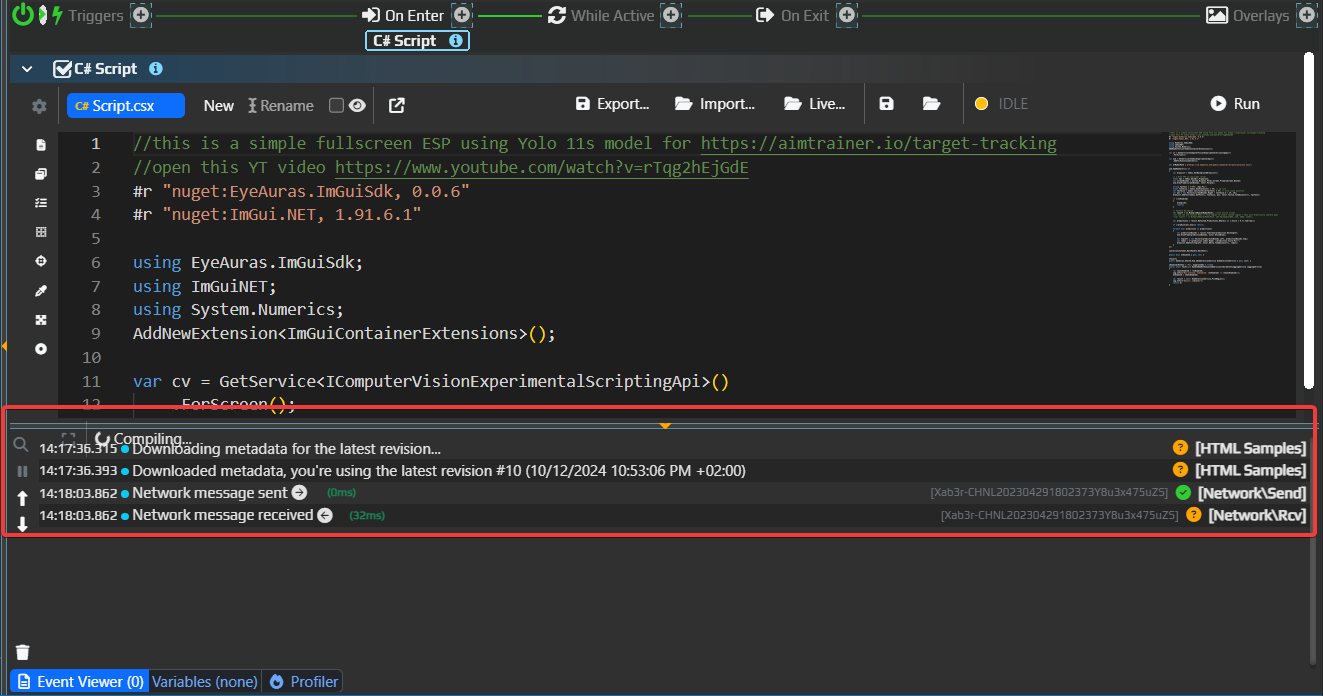
A problem was fixed where the ComputerVision API could not load models or images from HTTP links, and two examples were added:
This example shows how to:
ComputerVision that can be used for image search, ML, OCR, and moreSendInput for input simulationOnScreenCanvas for drawing on the screenIn practice, these three tools are already enough to build a full bot :) Everything is available out of the box.

Almost the same as above, but it uses ImGui — a very powerful drawing library that can be used both for full UI and for drawing boxes, text, and other elements directly on the screen.
.NET is the platform EyeAuras is built on. It affects everything: startup, memory usage, and data handling.
.NET 8 was chosen because of its new memory management system, which outperforms all previous versions in benchmarks and is still being tested internally by Microsoft, so even the latest .NET 10 does not have it yet. EyeAuras has always favored higher memory usage in exchange for better performance, so a fast garbage collector is not a luxury for us — it is a necessity. In this version we still use the OLD mechanism, but as soon as it is clear that the new version is stable, we will enable it. This should lead to measurable improvements across the entire application.

It now uses the new UI framework and feels faster and more responsive.
Old editor

New

Macro rendering has been heavily reworked. This is not noticeable for small macros (fewer than 50 nodes), but the larger the macro, the more obvious the difference becomes. These are not the final changes in this area.
I am calling this out as a separate section because probably every EyeAuras user has run into this at least once: you resize one panel, and it starts overlapping another. The most common case is the C# Action panel overlapping the Event Log.
This bug is known as the WPF Airspace issue, and it has existed for more than 12 years. In the Microsoft UI framework used by EyeAuras specifically, it has been present since July 2020 link

And now, finally, after years of waiting, Microsoft fixed it. Hooray! Unfortunately, this is exactly the kind of issue that is extremely hard to fix from the application side, so all that was left was to wait.

This fix matters not only because the UI is now much more usable on low screen resolutions, but also because it blocked the transition to the new UI for triggers and actions. Previously, the only option was to rewrite everything at once — all triggers and all actions — and only then release it. Imagine months of development that nobody could use until release, followed by a huge number of bugs.
Now I can rewrite everything gradually. The work will still take months, but now it is at least actually feasible.
PoeShared.Blazor.Controls is now available in scripts by default; this is where ReactiveSection / ReactiveButton liveReadManaged<T>, which is slower than Read<T> but supports the MarshalAs attributeReadExports now returns a readable name along with the exported one, for example ?StaticClass@UGameEngine@@SAPAVUClass@@XZ -> public: static class UClass * __cdecl UGameEngine::StaticClass(void)Putting this in separate section as probably all users of EA at one point of another seen that problem - you resize one of the panels and it starts overlapping with another, the most usual scenario is C# Action overlapping with Event Log.
This bug is known WPF Airspace issue and was known for at least 12 years. Specifically in the Microsoft UI framework that EyeAuras uses, it has been there since July 2020[https://github.com/MicrosoftEdge/WebView2Feedback/issues/356]
Ano now, finally, after years of waiting, this has been fixed by Microsoft. Yey. Unfortunately, this has been one of those issues which are very hard to fix on application-side, so I had to just wait.
This fix is important not only because now UI is more convenient to use on lower resolutions, but also it was a huge roadblock on migration of triggers/actions to a new UI framework. Before that the only viable approach was rewriting ALL of the triggers and actions in one go, I could not work on them on a 1-by-1 basis. As you can imagine, this is not really doable - full rewrite would take months of writing the code which nobody uses and then putting it all at once. Number of bugs would be stunning.
And now, I can start rewriting triggers/actions gradually. Rework will still take months, but it is doable.
ReadExports now returns human-readable version of export alongside with original name, e.g. ?StaticClass@UGameEngine@@SAPAVUClass@@XZ -> public: static class UClass * __cdecl UGameEngine::StaticClass(void)Fixed the problem with ComputerVision API not resolving models/images via HTTP links and created two examples:
In this one I am showing how to:
Realistically, these three combined are more than enough to create a bot :) All the tools are right there in the box.
Verrry similar to the one above, except for a fact that it uses ImGui - immensely powerful drawing library that could be to create UIs as well as draw boxes/text/etc right there on the screen.
Usb2Kbd is hardware input emulator. It has been supported by EyeAuras since ~2021.
Now you can create your own for approximately 5$ - the only thing that is needed is small device from AliExpress/Amazon.
Here is the detailed step-by-step guide (russian / english).
I've also improved technical part and reworked settings window for better user experience.
Started working on native integration with ImGui - this is alternative approach to script/UI creation in EyeAuras. This should be the simplest one for those who only recently started coding - yes, some boilerplate code is requires to get things started, but after that it is very easy to understand. And ChatGPT can greatly help you.
Finally, it is possible to create truly 1-script mini-apps that incapsulate both UI and automation logic.
ReadManaged<T> which is slower than Read<T>, but respects MarshalAs and managed structures