Builds

Available downloads

Stable is the recommended track for most users. Alpha gets you the newest capabilities first.

Stable 1.10.10117 Alpha 1.9.10071
Windows 10/11 x64 Administrator rights
Release Notes

Track recent changes

Every release stays linked here so you can inspect what changed before you switch versions.

Release

1.4.6694

Permalink 2 years ago

Aura Tree v2 - alpha

Rewritten Aura Tree - the thing on the left of the program where all auras management is happening - to use new UI tech. In the current iteration the goal is to replicate the existing functionality. Huge benefit of the newer UI tech is performance - it can handle even very large number of auras without any hiccups and problems. Some known problems are still there - e.g. drag'n'dropping the aura to root folder still leads to crash. The fix will be deployed in one of the following patches.

Right now both trees co-exist and are toggleable on the fly. Performance/loading speed benefits will be seen later when "there will be only one" (c) left

Aura Tree v1

Aura Tree v2

Configuration version control system - alpha

There is new option in Settings. It will make configuration being periodically saved into local Git repository. This opens up a bunch of possibilities:

  1. Backup - Due to how Git works, it is extremely reliable, meaning that even if something bad will happen there is a very good chance that the configuration could be restored from the repository
  2. History - Git allows to roll to any point of history, no matter was it 15 minutes ago or 3 months ago - everything that you've done will be logged in the repository.
  3. Remote backup - you can configure Git to push your configuration elsewhere, e.g. on a github. This way your auras will be available from anywhere.

P.S. Important! Option is available only when "File system storage" is enabled. This is already default for new users and will be switched on for everyone later in April. You can enable it yourself right now at any moment.

Bugfixes/Improvements

  • [Behavior Trees] Fixed a problem with BTs ticking after removal
  • [Bugfix] Attempted to dispose already disposed(or scheduled for disposal) resource #EA-326
Release

1.4.6654

Permalink 2 years ago

Bug reporting system improvements

Greatly improved the mechanism that accepts and parses bug reports - now I will be able to react to your reports in a much quicker fashion because each and every report will be also duplicated on EyeAuras bug tracker and in Discord. So, pretty please, write comment with some info about what you've been doing before the bug occurs if you're sending the report. It greatly helps!

YouTrack

And this is how it looks in Discord.

Discord

Fixed Wait Node

Changed how Wait node operates and looks - previously there was a problem with Wait node skipping the first tick. Also updated documentation: https://wiki.eyeauras.net/ru/behavior-trees/nodes/wait

eyeauras_axhsmldh9g.gif

Bugfixes/Improvements

  • [YoloEase] Few fixes related to stability + moved the project to public repository
Release

1.4.6627

Permalink 2 years ago

Execute Aura Action/Node - added execution strategy

Execute Aura node and action have received a minor improvement - now you can choose how to execute linked actions, in order or randomly pick one of them. The latter could be used, for example, to randomly pick one of teleports to a spot to make actions of your bot less predictable.

Bugfixes/Improvements

  • [YoloEase] Few minor fixes in how training scripts are executed
  • [UI] In triggers, changed the part which shows how much time till activation/deactivation

Release

1.4.6607

Permalink 2 years ago

Scripting/tuning/bugfixes

This release contains mostly different improvements and bugfixes from the first week of Behavior Trees being public and people starting doing some scripting in it.

On-screen-display - added Window and Region visualization

In all triggers of a Search family, new option is added which highlights on the screen the window that is being captured as well as the region inside window (if set) that is processed. This helps during debugging/configuration process a lot. Also ALL OSD checkboxes are bindable so you can very easily throw-in some HotkeyIsActive trigger, bind all checkboxes to its IsActive property and voila - you have toggleable overlay with all bounding boxes/regions/labels right on your screen.

Bugfixes/Improvements

  • [Image/Color/ML Search] Now videos that you save can be encoded by H.264 codec which provides a much better quality giving you better training materials
  • [Image/Color/ML Search] Fixed a bug in all *Search triggers with region not being correctly selected when anchor/offset is set
  • [ML Search] Fixed a bug - "Show more" was not working
  • [UI] Removed window transitions - these should speed up opening dialog windows a bit
  • [Crash] Fixed rare crash that sometimes occured when the program tried to acquire title of removed process
  • [Scripting] Exposed ViewportTransforms in all capture triggers - this could be used to transform game coordinates to screen coordinates and vice versa. Very useful if you want to draw an overlay using IOnScreenCanvasScriptingApi or click on in-game object using ISendInputUnstableScriptingApi.
  • [Scripting] Added support of relative path . which will return the aura/folder where the script is running. Refer to this example to get better understanding of what I am talking about
  • [Scripting] Added IsKeyDown/IsMouseDown to ISendInputUnstableScriptingApi - these methods allow to find out whether keyboard key or mouse button are currently pressed or not
  • [YoloEase] Extracted this tool to a separate Github project. Sources will be added a bit later. To those who missed it - this tool allows you to automate process of training machine-learning models by doing most of the work itself. All you have to do is feed it screenshots and labeled data.
  • [YoloEase] Improved quality of screenshots uploaded to CVAT
Release

1.4.6591

Permalink 2 years ago

Behavior Trees - public alpha is starting!

After about 6 months of work, I am very glad to finally kick off the public testing phase of the new tool in EyeAuras called Behavior Trees. In short, this is a new way of building logic of your bots and scripts, it is the very core of any automation. Previously, you had to use Triggers which brought Actions to life with OnEnter, WhileActive and OnExit sections. In the new approach, you will have much-much-much more extensive tooling that allows to add cooldowns, conditions, sub-routines (aka sub-trees) and all that powered by the new scripting subsystem.

This is a new "meta" and everything that exists right now in the program will be adopted and changed to be suitable for usage in trees. The reason is that I see this mechanism as the very thing that was missing in the program - being able to quickly and easily model something, be it a simple clicker or a complex combat rotation. The beauty of trees is that they can do both. Yes, they definitely require a bit of understanding, just like the previous system did, but it is much-much easier to manage when you have dozen of different skills, conditions, etc. Anyone, who tried to scrap something in EyeAuras that manages a bunch of different conditions (like I am alive and I have a skill ready and HP is > 40% and I have an active target and ...) knows what I am talking about.

Documentation/Getting started

English / Russian

p.s. I know that english version is a bit rough, but maintaining docs in two languages at the same time is a bit unrealistic, so I had to cut some corners here and used ChatGPT do automate the translation process :D I'll do some fine-tuning in the following months.

This is still alpha!

Please, keep in mind, that BTs have been used by maybe a dozen of people in scope of closed testing phase, so there is a high chance that something may not be working, something may be inconvenient and a lot will change in the next quarter. If you have any concerns or reports - please do not hesitate to contact me.

What is planned in the following weeks?

Right now, there are few very important pieces missing in BTs, such as:
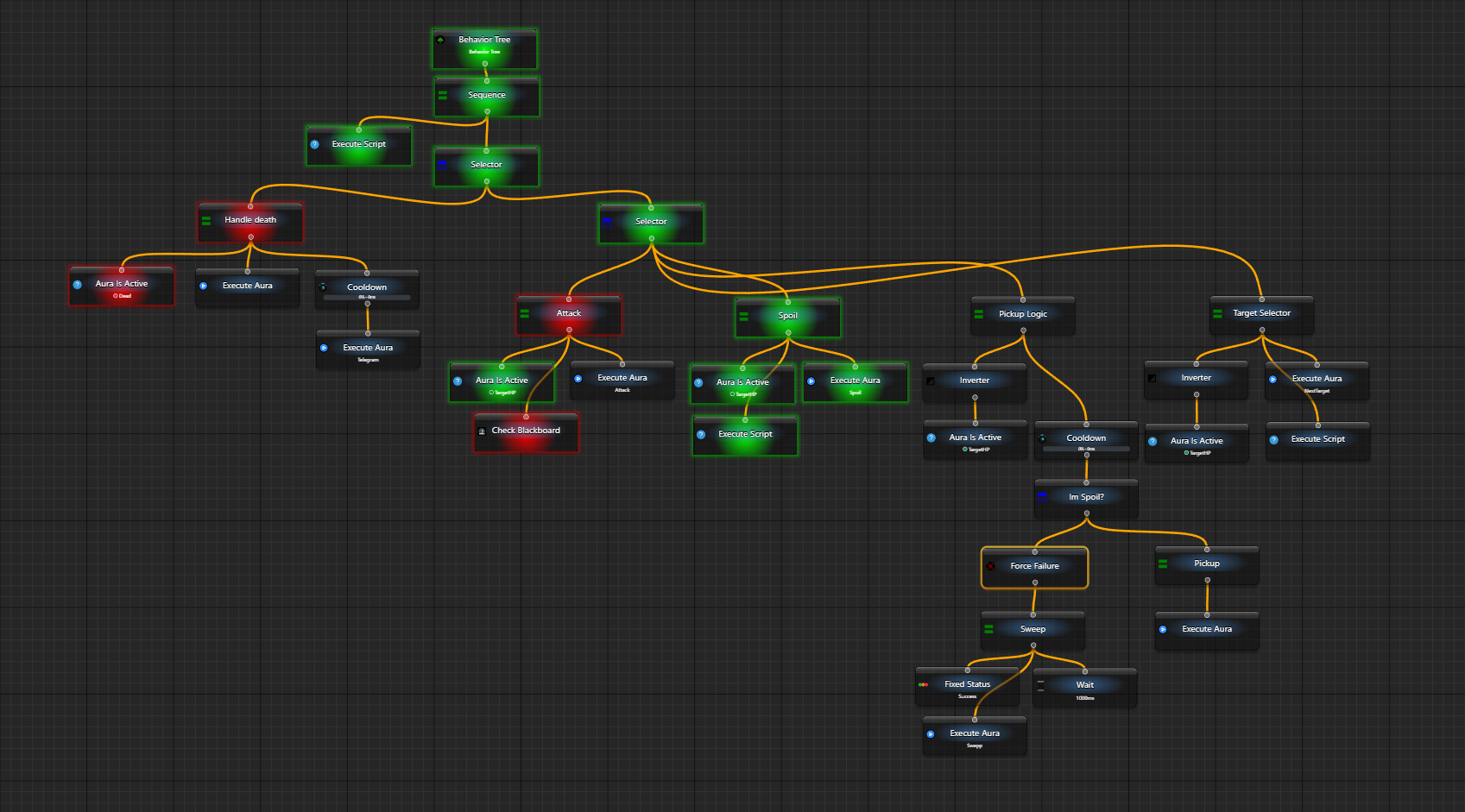
  • direct integration with input simulators Whenever you want to move mouse or click a button, you have to use SendSequence action paired with Execute Aura behavior tree node. It kinda works, but is not very convenient. The plan is to have most actions duplicated in the tree to make them easier to use and configure
  • direct integration with image search and ML search Again, as with input simulation, right now you have to use, for exmaple, Image Search trigger and pair it with Aura Is Active node, I'd want to make everything editable/configurable right in the tree editor
  • some control flow nodes are missing, such as Switch, IfThenElse and a few other. They are not required, but are quite convenient
  • the editor itself is a bit too cumbersome, I'd want to make it lighter, occupy less space and be, in general, more compact
  • documentation. I want to write A LOT of docs to cover different aspects of BTs - how they work, how they could and should be used, pros and cons, etc
  • scripting in scope of behavior trees. The rework of scripting system V2 was driven by BTs - since the very beginning I was planning that the most advanced users will definitely want to be able to code their custom nodes and conditions. And that is exactly what [Scripts V3](scripting subsystem are willing to fulfill

bt_l2.spoil.old.png

Bugfixes/Improvements

  • [YoloEase] Temporarily removed the tool from EyeAuras - very soon it will be available as a small separate open-source project
  • [SendSequence] Added missing "P" to OSD keyboard
Release

1.4.6531

Permalink 2 years ago

New Major Release

Performance Improvements

  • Significant improvements in launch times, memory usage at startup and during operation. CPU, and GPU usage for search is also improved, but not that much.
  • Implemented a few systems which are disabled by default in the current release, but will be tested and verified in Alpha branch starting next week. They are targeted at improving experience while using lower-end PCs such as virtual machines or old laptops. You can try them out yourself by enabling "File system storage(alpha)" in Settings - by ready for some potential issues though.
  • Tests show that, in most scenarios, machine learning-based search is now about ~15% faster overall, with some extreme cases being twice as fast as before. The main parameter improved is latency, so the program now reacts much faster to anything that happens on the screen - at each stage in the system (capturing the image, applying effects/resizing, preparing it for ML/image analysis, and delivering analysis results (predictions and found bounding boxes)) are now delivered to triggers much faster. In some cases, latency has dropped from the millisecond range (i.e., 1+ millisecond) to less than 100 microseconds. This will be very noticeable in high-frequency scenarios, like reacting to some object on the screen (e.g., item positions on the ground in Path of Exile or aimbot-like minigames where you have to track the object).
  • This is not the latest iteration of improvements. I am planning at least two more significant improvements (mainly in machine learning areas), but they will be delivered later, probably even after the next large release to the “Stable” channel at the end of Feb.

Image/Color/ML/Text Search Triggers - UI Rework

  • Added sections and hidden some advanced options by default (like adding offsets/anchors).
  • Major rework of region selection and capture image preview.
  • Gradual Zoom - now you can use the mouse wheel to zoom in/out. Hold the left mouse button to pan the image.
  • Selection rework - now you can select a region on a preview and use Ctrl+C or a button from the toolbar to copy part of the image to the clipboard or use it as a search template.
  • Save screenshot/video - this was available for quite some time in the Effects window, UI has changed and now it is available in the preview pane for easier access.
  • Video playback - you can now load any video in the Preview pane and use it for extracting a template image out of it or picking the correct capture region. DEMO

New Window Finder / Click Position Selector

  • Fully replaced the old selector, which was too laggy and unreliable. Just drag the icon anywhere, and the program will pick up the window/position. NOTE: It does not support clicking on the button & selecting the window afterwards, only dragging. Will be added in one of the future versions. Image

Scripts v3.0

  • Huge update to the scripting subsystem. This was all done as part of work around Behaviour Trees - since the very beginning, having a fast and convenient way to prepare smaller bits of code embedded right into the tree itself was a major goal, and the current implementation is too heavy for that - it is powerful, but too verbose and heavyweight.
  • Started writing documentation, available here with a few examples - Hello,World, printing text, moving the cursor with more to come
  • It is now in the early testing phase, and in the coming weeks, there will be a bunch of scripting-related updates, but if you want to start coding - do not hesitate to try out the newer system and, if you have any questions, contact me on Discord and ask anything.
  • NuGet packages - they are already supported but are disabled for now. I want to clean up all potential internal issues first and after that allow people to use external dependencies. Will enable them a bit later. If you really want to try them out now - contact me on Discord.
  • C# script Action and Trigger are already using v3, but WebUI is still on v2. The reason is that WebUI has several features that still require porting from v2 to v3 to match the expected functionality, e.g., exporting/importing code as a C# project. This will be implemented in the nearest weeks and released as part of a separate update.

Major Code Editor Improvements - Quick Fixes, Errors Highlighting, Tooltips, Signature Help, etc.

  • Error highlighting: Now, whenever some error is encountered in a script, there will be special markup showing that something is wrong in the code with a detailed description of the error. Note that it is reflected on both the scrollbar and the codemap as well. Error highlighting
  • Errors Quick fixes: If there is some well-known way to resolve an error, such as adding an additional import (using …), there will be a special button shown in the popup called “Quick Fix…”. Click on it, and the program will give you one or multiple potential quick fixes. The names are not very human-readable at the moment, and I'll work on that in future versions. Errors Quick fixes
  • Code completion improvements: Prototype of the documentation pane which will be showing XML docs right next to the method/property name. Currently in a very alpha-rough stage, no markup, no highlighting, etc.

Send Input and Send Text are No Longer Available in UI

  • These 2 actions are replaced by Send Sequence. It is easier to use and configure, especially in simple scenarios. Macro recording functionality is not fully ready yet.
  • Old actions are still fully functional, so nothing will break, only new auras will be affected. Image

New Input Type - Granny's Send Input

  • Added a new method of input. That one is quite old and this is the exact reason why many protections just forget that it exists. Helps to keep things under the radar.

Changed Auto-Update Download Source

  • Updates for the program were downloaded from Microsoft Azure cloud, with the expectation that due to vast infrastructure capabilities, download speed would be great in all regions, but… it ended up being worse than from a single server in Saint Petersburg.
  • Since this update, the program will download its updates from one of multiple servers located in Frankfurt, Germany, which is a major hub, and this should give most users at least “good enough” download speed. We'll see how it goes, and maybe I'll scale up that same approach and use multi-regional hosting as well. The current system allows me to fully control from which exact server the download will happen, so there is a wide range of control and possible improvements.
  • By the way, I'd want to remind you about a very useful option, located in Settings, called Automatically download updates. What it does is, well, it downloads updates… automatically. But does not apply them! Meaning that it won't break anything, the only difference from a fully manual update is that you will skip the download time. Image

Network Messages Broadcasting Functionality (Early-Early Alpha)

Send Message / Network Message action/trigger pair is a powerful tool that can help you build your own controllable network of inter-connected EyeAuras. This has been available for a few years at this point and is used mostly for multi-boxing (on multiple PCs) purposes.

What was always a problem is latency - all messages had to come through one of EyeAuras servers, which introduced latency. The new broadcasting mode allows you to use your local network to exchange messages between PCs, which basically eliminates any latency.

The feature is still in early alpha and very rough on the configuration side of things - you have to specify the IP manually, for example. Also, it may not work in some configurations where routers do not support multicast. Also, the feature is not properly tested yet, so use it with discretion.

To use this new feature, set ChannelId to:

  • On Server EyeAuras (one that listens for messages) - set broadcast://255.255.255.255/anychannelname
  • On Client EyeAuras (one that sends messages) - set broadcast://255.255.255.255/anychannelname

p.s. by default, the program uses port 53082 for communications, but you can pick any other port if you want, right after IP in ChannelId (e.g., broadcast://255.255.255.255:55055/anychannelname)

Behaviour Trees

  • In 1 week or so, the functionality will become available in the alpha branch. This highly depends on the number of bugs which will be discovered after the publication of the current version to the main branch.

Bugfixes/Improvements

  • [Crash] Fixed a rare crash during import (ReplaceId NullReferenceException).
  • [Crash] Fixed a rare crash in LegacyScriptReferencesResolver.
  • [Crash] Fixed a crash that sometimes happened during startup "Container must be defined (Parameter 'container')".
  • [PlaySound] Fixed a bug that would not allow creating this action via UI.
  • [PlaySound] Fixed a bug that sometimes reverted the selected notification to Disabled.
  • [UI] When an aura has only 1 action/trigger/overlay, the editor for that item will be expanded to occupy all available space. This should make working with such auras a much more pleasant experience, especially after I adapt all editors to benefit from that change.
  • [UI] Completely rewritten secondary panel with log and variables.
  • [UI] All windows and overlays now open faster.
  • [UI] The Import dialog can now perform Synchronization as well.
  • [UI] Added a Getting Started pane which is displayed in empty Auras. It has Import/Subscribe buttons which should make life easier for guys who just want to use someone else's aura pack.
  • [UI] Fixed an error which prevented Cloning and Moving items up and down.
  • [UI] Fixed a problem with Replay not working correctly with low FPS.
  • [WindowSelector] The WindowSelector now captures the process name as a final argument. Previously, when you picked a window, the program captured “Window handle OR Window Title”. Now it is “Window Handle OR Window Title OR Process Name”.
  • [Scripting] Numerous improvements in the scripting subsystem - it's now faster and more memory-efficient.
  • [Scripting] ImageSharp library added to the SDK. In some aspects, it's more convenient than OpenCV, and likely, future APIs will be built around it.
  • [Scripting] Made it so if a script compiles successfully previous errors are cleared.
  • [Scripting] Fixed a problem with Code editor tabs not selecting files properly when changed.
  • [General] Improved the accuracy of all waits and delays, now with a margin of error within 1ms.
  • [Search Triggers] Fixed a bug with some capture sources (e.g., Shared Surface) that happened when Capture Borderless is selected.
  • [Search Triggers] Changed how Capture Borderless option works. Still far from ideal, but should cover more cases now, especially if windows do not do anything fancy with its borders/title bar.
  • [Search Triggers] Fixed “Task canceled” exception being shown in UI.
  • [Text Search] Fixed a crash that happened when a trigger with running text recognition was disabled by enabling condition.
  • [Bugfix] Fixed a bug which in some cases led to the program deadlocking at startup (a very long-living and nasty bug, hopefully, it is finally dead).
  • [Bugfix] Fixed a bug in the aura selection window - in some cases, auras were hidden and not available for selection.
  • [Bugfix] Fixed a bug that would crash UI when items were reordered.
  • [Bugfix] Fixed a bug in Replica overlays - Keep Aspect Ratio was not properly calculating width/height of the overlay when the source was resized.
  • [EventLog] Fixed a problem with the event log being displayed outside app bounds.
  • [EventLog] Added an “Inputs” category, which contains inputs generated by the program.
  • [Synchronization] Fixed a bug that caused the program to crash if synchronization was added inside a folder that was already synchronized.
  • [Synchronization] Fixed a bug with auras not being saved after downloading a new version of a sync.
  • [Effects] Fixed IsEnabled status not being saved into config (disabled effects were re-enabled at startup).
  • [Enabling Conditions] Fixed enabling conditions properties not being saved/loaded properly under some circumstances.
  • [Overlays] Fixed overlays “stuttering” when either user or script changed the position/size of an overlay.
  • [SendInputs] Fixed a problem with “Granny's Send Input” positioning (the mouse was moved incorrectly on multi-monitor setups).
  • All inputs should be more reliable now in terms of mouse positioning - changed the way how coordinates are calculated.
  • [C# Action/Trigger] Added a few more options like automatic stop of the script if it is running for too long + a few other UI/UX tweaks.
  • Done some documentation updates which are reflected in both the SDK and on the website. In the following weeks, there will be a bunch of articles/examples focusing on the beginner audience.
Release

1.4.6530

Permalink 2 years ago

BUGFIXES/IMPROVEMENTS

  • [SendSequence] Fixes an issue with this action not working properly when used in behavior tree
Release

1.4.6523

Permalink 2 years ago

BUGFIXES/IMPROVEMENTS

  • [Crash] Fixed crash which happened sometimes during startup "Container must be defined (Parameter 'container')"
Release

1.4.6518

Permalink 2 years ago

Release candidate

One of final versions before moving everything to main branch.

BUGFIXES/IMPROVEMENTS

  • [UI] Fixed a problem with Replay not working correctly with low FPS
  • [Script] Fixed a problem in Code editor tabs
Release

1.3.6491

Permalink 2 years ago

Further code editor improvements - added code formatting and showing exact script lines where an error has occurred

Including line number into error messages

Whenever scripting subsystem encounters and error, it will log the exact line of code that led to this and this info will be shown in both application logs(file) and event log.

Code Formatting

Writing code without any kind of automatic formatting is a painful process and this feature addresses that. Now you can either press Ctrl+Alt+Enter or use context menu to format the document automatically. It will put in additional line breaks, missing spaces, indentation, etc.

The current version is quite simple, but it is still much better than doing everything manually

BUGFIXES/IMPROVEMENTS

  • [Event Log] Few UI tweaks here and there to make it look prettier
  • [Bugfix] Fixed crash which sometimes happened during startup ("Item list of type …")